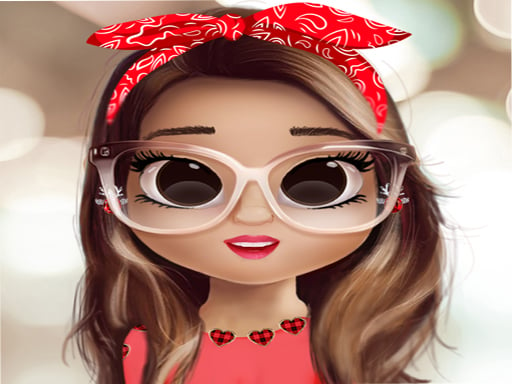
Creative Style Studio offers a delightful, pressure-free experience for young fashion enthusiasts. The avatar customization is extensive, with many skin tones and hairstyles. The wardrobe is large and varied, allowing for countless outfit combinations. The controls are intuitive, making it easy for kids to play independently. The lack of timers and scores encourages relaxed creativity. Saving favorite looks is a nice touch. Overall, it is a high-quality, family-friendly game that promotes self-expression.
Creative Style Studio is a digital fashion playground where players design and dress up their own avatars. The game focuses on self-expression through clothing and appearance choices. Players begin by selecting basic features for their character, such as skin tone and facial details. After establishing the avatar's look, they explore a wardrobe filled with various tops, skirts, dresses, and accessories. The objective is to create visually appealing outfits by mixing and matching different pieces. There are no scores or time limits, allowing players to experiment freely. The game encourages creativity and personal style development. It is designed to be accessible for young players, with simple controls and a colorful, friendly interface. All content is appropriate for children, with no mature themes or violent elements. The game provides a safe space for kids to explore fashion and design concepts. Players can save their favorite looks to revisit later. The experience is entirely about artistic expression and having fun with colors and patterns.
Players start by customizing their avatar's appearance. They select a skin tone from a palette of options. Next, they choose eye colors, hairstyles, and hair colors to define the character's face. After the avatar is ready, they move to the wardrobe section. Here, they browse through categories like dresses, tops, skirts, and accessories. Items are selected by tapping or clicking on them. The chosen piece appears on the avatar instantly. Players can change any item at any time by selecting a different option. They can also remove items to start over. The interface is designed for easy navigation, with large icons and clear labels. There are no timers or scoring systems, so players can take as much time as they like. Once satisfied with the look, they can save it to a personal collection. The game supports both desktop and mobile devices, with touch-friendly controls on tablets and phones.
The game offers a wide range of customization options for avatar creation. Players can choose from multiple skin tones, eye colors, hairstyles, and hair colors. The wardrobe includes a large selection of dresses, tops, skirts, and accessories. All items can be mixed and matched freely. The interface is kid-friendly, with simple drag-and-drop or tap controls. There are no timers, scores, or pressure to complete tasks. Players can save their favorite outfits to a personal gallery. The game is designed for solo play, allowing for uninterrupted creative sessions. All visual content is bright, colorful, and appropriate for children. The game does not contain any advertisements or external links. It is optimized for both desktop and mobile browsers.
To get the most out of the game, try combining unexpected colors and patterns. Don't be afraid to experiment with different hairstyles and accessories. Save your favorite looks to see how your style evolves over time. Sharing your creations with friends can inspire new ideas and make the experience more enjoyable. Remember, there are no wrong choices in this game, so have fun and express yourself freely.





Comments
0 comments